نکسا — ایجنت هوش مصنوعی مالی فارسی
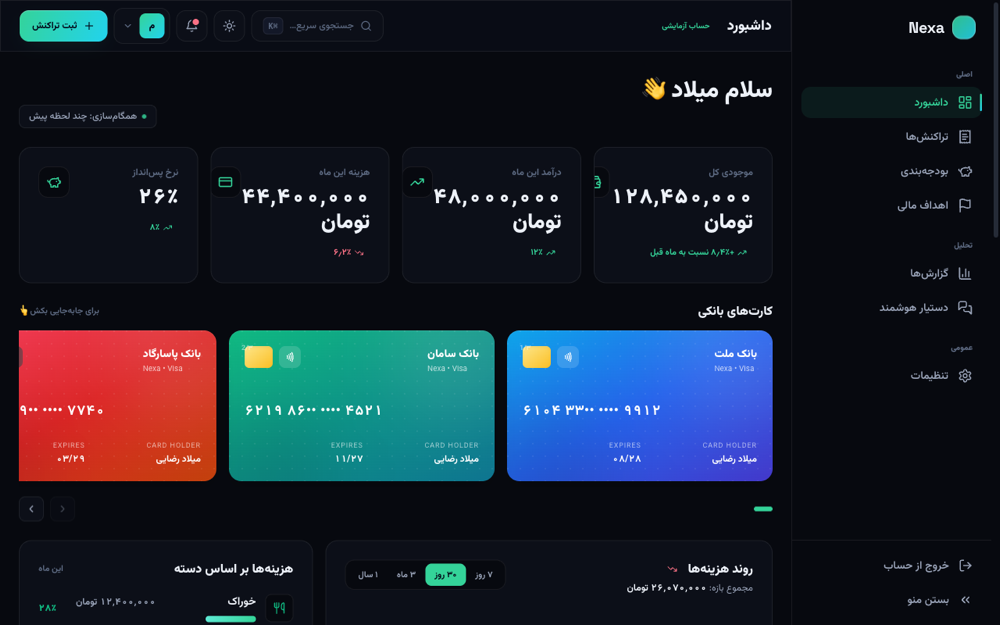
نکسا یک اپلیکیشن وب مدیریت مالی شخصی به زبان فارسی است که با Vue 3، Vite و Tailwind CSS ساخته شده. شامل صفحه لندینگ، داشبورد با کارتهای بانکی و نمودار هزینهها، دستهبندی تراکنشها، اهداف مالی و یک ایجنت هوش مصنوعی چت فارسی است. تم تیره و روشن دارد و کاملاً ریسپانسیو است.
نیاز فوری داری؟
ساختهشده با: مدل DeepSeek V4 Flash روی FreeBuff
Build a premium, production-quality Persian RTL fintech SaaS web application called Nexa. This is NOT a simple landing page. I want it to look and feel like a real funded startup product that could be launched today. The main goal is visual impact. The website will be recorded as a short Instagram Reel, so the first few seconds must immediately look impressive. Tech Stack Use: * Vue 3 * Vite * `<script setup>` * Tailwind CSS * Lucide icons * Chart.js or ApexCharts for charts Do not create a static mockup. Build a functional interactive frontend. All visible user-facing content must be in Persian and the entire interface must use RTL layout. Use realistic Iranian financial data and Persian names instead of lorem ipsum. Visual Direction Create a sophisticated modern fintech aesthetic inspired by premium SaaS products. Use: * Dark premium background * Glassmorphism selectively * Large elegant typography * Subtle gradients * Soft shadows * Thin borders * Beautiful cards * Generous spacing * Smooth animations * Premium hover states * Animated counters * Interactive charts * Subtle background glow effects Avoid making everything rounded. Avoid excessive gradients. Avoid the generic AI-generated landing page look. The final result should feel carefully designed by a senior product designer. LANDING PAGE Create a visually impressive landing page. Navbar Logo: Nexa Navigation: محصول امکانات امنیت قیمتگذاری Buttons: ورود شروع رایگان Navbar should be transparent initially and gain a blurred background while scrolling. HERO Main headline: پولت رو فقط خرج نکن. بفهم کجا میره. Supporting text: Nexa با کمک هوش مصنوعی درآمد و هزینههای شما را تحلیل میکند و کمک میکند تصمیمهای مالی بهتری بگیرید. Primary CTA: شروع رایگان Secondary CTA: مشاهده دمو Include a premium interactive product preview behind or below the hero. Add subtle animated financial elements in the background. Do NOT use generic stock illustrations. SOCIAL PROOF Create a small credibility section: +۱۲,۰۰۰ کاربر ۲.۴ میلیارد تومان هزینه تحلیلشده ۴.۹ از ۵ رضایت کاربران Animate these numbers when they enter the viewport. PRODUCT SHOWCASE Show an impressive preview of the actual dashboard. The dashboard should appear inside a realistic browser/application frame. As the user scrolls, reveal different dashboard elements with subtle animations. AI FEATURE Create a section introducing: دستیار مالی هوشمند Nexa Example AI insight: «میلاد، هزینه سفارش غذای شما این ماه ۲۳٪ افزایش داشته. اگر با روند ماه قبل ادامه بدی، میتونی حدود ۱٬۸۵۰٬۰۰۰ تومان در ماه صرفهجویی کنی.» Add an interactive AI chat interface. Example questions: «این ماه بیشتر پولم کجا رفته؟» «چطور ۵ میلیون بیشتر پسانداز کنم؟» «هزینههام رو با ماه قبل مقایسه کن.» When clicking these questions, simulate an AI response with a typing animation. DASHBOARD Create a complete `/dashboard` page. Sidebar items: داشبورد تراکنشها بودجهبندی اهداف مالی گزارشها دستیار هوشمند تنظیمات DASHBOARD OVERVIEW Header: سلام میلاد 👋 Subtitle: اینم وضعیت مالی امروزت. Show: موجودی کل ۱۲۸٬۴۵۰٬۰۰۰ تومان +۸.۴٪ نسبت به ماه قبل Add an animated balance counter. BANK CARDS Create beautiful virtual Iranian bank cards. Examples: بانک ملت بانک سامان بانک پاسارگاد Each card should show realistic masked card numbers. Allow users to horizontally switch between cards. EXPENSE ANALYTICS Create an interactive chart titled: روند هزینهها Filters: ۷ روز ۳۰ روز ۳ ماه ۱ سال Changing the filter should update the chart with animation. EXPENSE CATEGORIES Show categories such as: خوراک خرید حملونقل قبوض سرگرمی اشتراکها Show percentages and visual progress indicators. RECENT TRANSACTIONS Use realistic transactions: اسنپ -۱۸۵٬۰۰۰ تومان دیجیکالا -۲٬۴۵۰٬۰۰۰ تومان حقوق +۴۸٬۰۰۰٬۰۰۰ تومان کافه لمیز -۳۴۵٬۰۰۰ تومان Spotify -۳۲۰٬۰۰۰ تومان Show appropriate icons for each transaction. Add filters and search. FINANCIAL GOALS Create a section called: اهداف من Example goal: خرید MacBook Pro هدف: ۱۲۰٬۰۰۰٬۰۰۰ تومان پسانداز شده: ۷۸٬۵۰۰٬۰۰۰ تومان Display a beautiful animated progress visualization. Add another goal: سفر ژاپن 🇯🇵 AI INSIGHTS Create several intelligent insight cards. Examples: 🔥 «هزینه غذای بیرون این ماه ۲۳٪ بیشتر شده.» 💡 «با لغو اشتراکهای بدون استفاده سالانه ۳٬۸۰۰٬۰۰۰ تومان صرفهجویی میکنی.» 📈 «نرخ پساندازت این ماه از ۱۸٪ به ۲۶٪ رسیده.» Make these cards visually distinct. COMMAND PALETTE Add a premium command palette. Pressing: CMD + K should open it. Available actions: ثبت تراکنش جستجوی تراکنش پرسیدن از هوش مصنوعی ایجاد هدف جدید مشاهده گزارش ماهانه This interaction should feel extremely polished. INTERACTIONS Implement: Smooth scrolling Animated counters Chart transitions Skeleton loading Beautiful tooltips Toast notifications Dropdown animations Hover interactions Page transitions Command palette Interactive AI responses Dark/light mode Responsive sidebar Mobile navigation Do not overdo animations. Animations should feel subtle and premium. RESPONSIVE DESIGN The website must look exceptional on: Desktop Tablet Mobile Pay special attention to the mobile dashboard because the project will also be shown inside an Instagram Reel. IMPORTANT Do not just generate one giant component. Create reusable components and a proper application structure. The website should be fully runnable. Do not leave TODOs. Do not use placeholder boxes. Do not use lorem ipsum. Do not use fake broken images. Every visible section should look finished. The final product should look like a real Persian fintech startup that has spent months designing its product. Prioritize: 1. Visual quality 2. Typography 3. RTL accuracy 4. Micro-interactions 5. Dashboard quality 6. Mobile responsiveness 7. Realistic Persian content Make the result impressive enough that someone seeing a 15-second screen recording on Instagram would stop scrolling and ask: «این سایت رو با چی ساختی؟»
چه چیزی در این دمو ساخته شده
- صفحه لندینگ با انیمیشن و شمارندههای متحرک
- داشبورد: کارتهای بانکی، نمودار هزینهها، دستهبندی تراکنشها و اهداف مالی
- ایجنت هوش مصنوعی با چت تعاملی فارسی
- منوی فرمان با ⌘K، حالت تیره و روشن، طراحی کاملاً ریسپانسیو
چطور خودتان یکی مثل این بسازید
این پروژه با FreeBuff ساخته شده — یک ابزار خطفرمان رایگان برای کدنویسی با هوش مصنوعی که بهجای اشتراک ماهانه، با تبلیغ متنی داخل خطفرمان کار میکند. مدل استفادهشده DeepSeek V4 Flash بود.
مراحل: از freebuff.com نصبش کنید، مدل DeepSeek V4 Flash را انتخاب کنید، پرامپت زیر را همانطور که هست کپی و به آن بدهید. خروجی یک پروژهی Vue کامل و قابل اجراست.
روی سیستم خودتان اجرا کنید
سورسکد کامل روی گیتهاب باز است. با Node.js نسخه ۱۸ به بالا، پروژه را کلون کنید، وابستگیها را نصب کنید و اجرا کنید. دستورهای دقیق در فایل README مخزن آمده است.
این دمو با هوش مصنوعی ساخته شد. ایجنت کسبوکار شما هم میتواند.
اول ایجنت به پیام مشتریهای شما در وبسایت، تلگرام و اینستاگرام جواب میدهد. ساخت حساب رایگان است.
شروع رایگان